
Quick answer
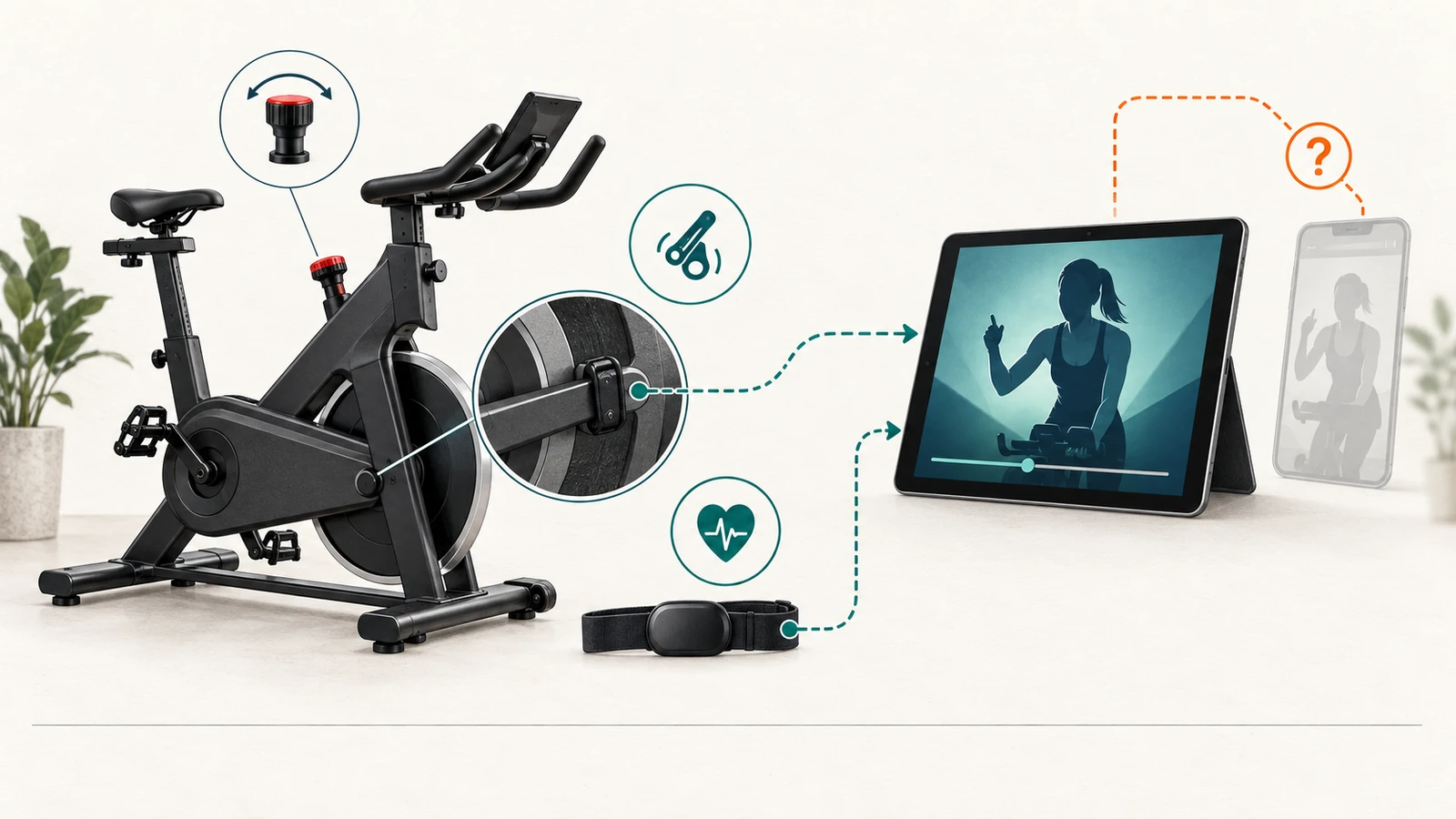
A bike can be useful with Peloton classes at several different levels: class playback only, class playback plus heart rate, real-time cadence from an external sensor, or a documented bike-to-app metric connection. Those levels are not equivalent.
For the current U.S. sources rechecked here, Schwinn IC4 and BowFlex C6 have manufacturer instructions for an Apple-device Peloton cadence path under Connected Devices → Cadence. Current BowFlex product pages still describe VeloCore compatibility with Peloton, but the previously accepted VeloCore support and integration routes did not provide a current metric-and-direction map in this recheck. Horizon says the current 5.0 IC is compatible with Peloton and Bluetooth FTMS apps, but its checked support page does not map the exact Peloton metrics, operating system, or connection direction.
A basic bike can also remain useful for Peloton class playback. On Apple iOS, Peloton officially documents a generic Bluetooth cadence-sensor path that can add real-time cadence without requiring the bike itself to transmit data. None of these checked third-party paths establishes Peloton leaderboard access, bike-to-app power, speed, distance, or automatic resistance control.
Compatibility scope and bounded current set
This guide uses a bounded, non-exhaustive current set selected before drawing outcomes:
- Schwinn IC4.
- BowFlex C6.
- BowFlex VeloCore product-family records covering current 16- and 22-inch console options; the current metric path remains unresolved.
- Horizon 5.0 IC.
- A generic indoor bike paired with an external Bluetooth cadence sensor on Apple iOS as a fallback path.
The set was included because current manufacturer or Peloton documentation describes a Peloton connection path and the equipment is still represented on a current official U.S. product or category page. It is not a market census, ranking, “best bikes” list, or claim that every hardware revision remains supported.
This article does not include a bike merely because its marketing copy says “app compatible,” because it uses Bluetooth, because it supports FTMS with another platform, or because a retailer or reviewer says it works. The exact manufacturer path must identify Peloton or Peloton must identify a generic sensor path.
For the specific IC4 record, see Schwinn IC4 for Small Spaces; for the format decision, see Schwinn IC4 or a Folding Exercise Bike. The WalkingPad app-compatibility guide is a separate device and platform example.
What “works with Peloton” can mean
Before evaluating a bike, define the requested outcome. At least six different claims are commonly compressed into the word “compatible”:
| Requested outcome | What would support it | What does not prove it |
|---|---|---|
| Class playback | Peloton App can play the cycling class on the chosen device and membership | Bike Bluetooth, cadence, or FTMS |
| Heart-rate display | Compatible watch or monitor connects to Peloton under the exact device path | Heart-rate receiver on the bike console |
| Cadence in the Peloton App | Peloton or manufacturer documents the exact cadence connection | RPM shown only on the bike console |
| Power, speed, or distance in Peloton | Exact metric is named for that bike/app path | A general “Bluetooth” or “FTMS” claim |
| Resistance control | Peloton sends commands and the bike changes resistance | Manual resistance cues or numbered resistance levels |
| Peloton Bike-style experience | Exact membership, metrics, leaderboard, controls, and device behavior are documented | Third-party class playback plus one metric |
A result can be useful even when it is limited. The problem is not cadence-only support; the problem is presenting cadence-only support as full Peloton Bike equivalence.
Evidence parity and major gaps
The candidate records do not have identical documentation depth.
- Schwinn publishes a seven-step IC4 Peloton cadence procedure for an Apple phone or tablet.
- BowFlex publishes current C6 cadence steps, while the previously accepted C6 integration route redirected during this recheck and did not provide a current metric-exclusion table.
- Current BowFlex VeloCore product and Explore pages retain a general Peloton-compatibility statement, but the accepted VeloCore support route returned a transport error and the accepted integration route redirected; cadence and two-device workflow remain unresolved in this recheck.
- Horizon states that 5.0 IC is compatible with Peloton and other FTMS apps, yet the checked article sends the reader to the owner’s manual and does not identify the Peloton metric fields or operating-system scope.
- Peloton publishes a generic Apple-iOS cadence-sensor route that is independent of a named bike.
No direct pairing, latency, reconnect, update, accuracy, or fallback observation was performed for any candidate. A more detailed instruction page is not proof that the underlying connection is more reliable. Official support is not observed pairing.
Peloton App identity and current device requirements
The current U.S. Apple listing identifies Peloton: Fitness & Workouts, app ID 792750948, sold by Peloton Interactive, Inc. The checked listing showed latest version 15.132.0, requires iOS or iPadOS 17.0 or later, and also lists Apple TV and Apple Watch variants. The listing proves current app availability and platform requirements; it does not prove that every bike connection works on every supported Apple device. See the current Peloton App Store listing.
The current U.S. Google Play listing identifies package com.onepeloton.callisto, sold by Peloton Interactive, Inc. It says version 3.36.0 requires Android 7.1 or later. The Android app supports class playback, activity tracking, heart-rate devices, and Wear OS features. Those facts do not establish the Apple-only bike-cadence paths documented by Schwinn and BowFlex. See the current Peloton Google Play listing.
Record app ID or package, seller, version, operating system, device model, store region, and checked date. “Peloton app installed” is not a complete compatibility record.
Membership and cardio-class access
Peloton’s current membership comparison separates App One and App+. It lists cadence tracking and real-time metrics from third-party devices among app features, while the cardio-equipment class row gives App One three cycling, treadmill, or rowing classes per month and App+ broader cardio-equipment class access.
The current pages are dynamic, and membership names, prices, trials, class limits, and feature placement can change. This package therefore does not freeze a reusable subscription price or promise that today’s tier boundary will remain in force.
A compatibility record should state:
membership tier checked
class access needed
trial or paid state
renewal_path
account_region
feature_needed
checked_date
The app being free to download is not the same as unlimited cycling-class access. A manufacturer saying that a separate Peloton digital subscription is required does not tell the buyer which current Peloton tier supplies the required class access.
Class playback is not equipment connection
Peloton markets app workouts for use with or without Peloton equipment, and the current Android listing explicitly describes energetic classes on any bike. That establishes a playback path: place a supported phone, tablet, television, or other permitted device where the class can be seen or heard and adjust the bike manually.
Playback alone does not establish:
- bike discovery;
- cadence, heart rate, power, speed, or distance from the bike;
- leaderboard participation;
- automatic resistance;
- resistance-callout conversion;
- bike controls in the app;
- workout completeness or data accuracy.
A buyer who needs only instruction and entertainment may accept playback-only. A buyer who requires an exact live metric must verify that metric separately.
Generic Bluetooth cadence-sensor path
Peloton’s current cadence guidance says the Peloton App on Apple iOS supports third-party Bluetooth cadence sensors. The documented sequence is to start a cycling class, open Connected Devices, choose Cadence, and select the sensor.
This is a useful fallback because it can be independent of the bike’s electronics. It does not make the bike itself Peloton-compatible in a broader sense. The sensor still requires:
- exact device and iOS eligibility;
- correct installation on the crank arm or shoe according to the sensor instructions;
- battery and Bluetooth permission;
- successful discovery in the current app;
- stable cadence display during the class;
- a manual resistance workflow;
- a fallback when the sensor is unavailable.
The checked Peloton source does not document this generic cadence-sensor route for Android. Android app availability is therefore not evidence of Android cadence-sensor parity.
Current bike paths checked
The following records are product-specific or product-family-specific documentary paths, not observed results.
| Bike path | Peloton source state | Requested device in checked instructions | Metric explicitly documented | Control explicitly documented |
|---|---|---|---|---|
| Schwinn IC4 | Manufacturer step-by-step page | Apple phone or tablet | Cadence | None |
| BowFlex C6 | Current manufacturer step-by-step page; former integration-table route redirected in recheck | Apple phone or tablet / iOS | Cadence | Other metrics not established in current recheck |
| BowFlex VeloCore 16/22 | Current product/Explore pages state Peloton compatibility; support/integration metric routes unresolved | Not specified in current recheck | Not specified | Not established |
| Horizon 5.0 IC | Manufacturer compatibility article | Not specified in checked article | Peloton metric fields not specified | None |
| Generic cadence sensor | Peloton guidance | Apple iOS | Cadence | None |
“None” in the final column means no Peloton resistance-control support was identified in the checked source for the declared path. It is not a statement that every future app version or every unsupported workaround has been tested.
Schwinn IC4
Schwinn’s current IC4 connection guide instructs the user to enable Bluetooth on an Apple phone or tablet, press the bike’s Bluetooth button, start a Peloton cycling program, choose Connected Devices, choose Cadence, and select the machine. The documented output is cadence in the Peloton App.
The current IC4 product page establishes that the model remains represented by Schwinn, but product presence is not a pairing result.
The checked Peloton path does not document:
- power, speed, distance, or resistance transmitted to Peloton;
- Peloton control of the bike;
- resistance-number equivalence with instructor callouts;
- Android support for the same native-bike path;
- successful pairing on the buyer’s exact console revision;
- behavior after an app, phone, firmware, or operating-system update.
Current disposition: official support with named conditions for Apple-device cadence; everything beyond that named metric remains separate.
BowFlex C6
BowFlex’s current C6 Peloton instructions use the same Apple-device cadence sequence: Bluetooth, Peloton cycling program, Connected Devices, Cadence, and select the machine. The rechecked page did not establish a current Peloton power, speed, distance, leaderboard, or resistance-control result.
The former C6 integration route redirected during the September 13 recheck, so its former metric exclusions are not repeated as current evidence. The current BowFlex products page still lists the C6 product lane, but purchase status and app support remain separate checks.
Current disposition: official support with named conditions for Apple-device cadence; Android native-bike cadence, power, speed, distance, leaderboard, and automatic resistance remain not established by this recheck.
BowFlex VeloCore 16 and 22
The accepted VeloCore Peloton support article returned a transport error during the September 13 recheck, so its prior two-device cadence workflow is not promoted as current evidence.
The VeloCore integration route redirected to the current BowFlex Explore page, which states general Peloton compatibility for VeloCore but does not name a current Peloton metric or direction. The current VeloCore product page redirected to the current VeloCore 22 product page, which retains general Peloton app compatibility and lists 16/22 touchscreen options.
The built-in screen and general app-compatibility text do not establish a native Peloton session, a two-device cadence workflow, or metric/control behavior. JRNY state remains separate.
Current disposition: product-family compatibility statement observed; Peloton metric connection not verified.
Horizon 5.0 IC
Horizon currently lists the 5.0 IC on its U.S. bikes page. Horizon’s updated 5.0 IC app-connect article says the cycle is compatible with Peloton, Zwift, @Zone, and other Bluetooth FTMS apps; it directs the reader to the owner’s manual for pairing instructions.
The checked article also says a compatible heart-rate monitor may display heart rate in an app but not on the 5.0 IC console. Its explicit no-automatic-resistance statement is written for Zwift Erg mode, not as a complete Peloton metric map.
The article does not identify, for Peloton:
- Apple versus Android support;
- exact metric fields;
- bike-to-app versus sensor-to-app direction;
- whether Peloton receives cadence, power, speed, distance, or heart rate from the bike;
- any resistance-control path;
- exact supported serial or hardware revision.
Current disposition: metric connection not verified until the exact current manual and a controlled pairing test resolve the Peloton fields and direction.
Current support matrix
| Candidate | Playback | Native bike cadence | Power in Peloton | Speed/distance in Peloton | Peloton resistance control | Current documentary result |
|---|---|---|---|---|---|---|
| IC4 + Apple device | Yes with membership access | Documented | Not documented | Not documented | Not documented | Official support with named conditions |
| C6 + iOS | Yes with membership access | Documented | Not established in current recheck | Not established in current recheck | Not documented | Official Apple-device cadence path with named conditions |
| VeloCore + iOS mobile device | Yes with membership access | Not specified | Not established in current recheck | Not established in current recheck | Not established | Product compatibility stated; metric connection not verified |
| Horizon 5.0 IC | Yes with membership access | Not specified | Not specified | Not specified | Not specified | Metric connection not verified |
| Basic bike + Apple cadence sensor | Yes with membership access | Sensor cadence documented | Not documented | Not documented | Not documented | Official sensor support with named conditions |
| C6 or IC4 + Android | Playback available | Native-bike cadence not documented in checked path | Not documented | Not documented | Not documented | Playback only or defer until tested |
“Not documented” is not the same as a proved technical impossibility. It means the requested support was not established for the exact current scope.
Connection and metric direction
Use arrows instead of the word “sync.”
bike or cadence sensor → Peloton App cadence display
heart-rate sensor or watch → Peloton App heart-rate display
Peloton App → class audio and video
rider → manual resistance control
The checked paths do not establish:
Peloton App → third-party bike resistance
third-party bike console ← Peloton class target
bike → Peloton leaderboard-equivalent output
Peloton membership → bike firmware or local console features
A Bluetooth connection can carry one metric, several metrics, or control commands. The protocol name alone does not identify the actual fields or direction that Peloton accepts.
Cadence is not power, speed, distance, or resistance
Cadence is crank revolutions per minute. It can help a rider follow an instructor’s RPM cue. It does not by itself reveal:
- mechanical or estimated power;
- bike speed;
- distance;
- resistance setting;
- equivalent Peloton resistance;
- work, calories, or output accuracy.
BowFlex’s current C6 step-by-step page names Cadence; the former C6 and VeloCore integration routes did not provide current metric tables during this recheck. Schwinn’s IC4 instructions name cadence and do not expand the result. A buyer who needs power or resistance automation should not treat cadence support as a near-equivalent substitute.
Resistance remains manual in the checked Peloton paths
The checked IC4, C6, VeloCore, generic-sensor, and Horizon records do not establish Peloton-to-bike automatic resistance control. The user should expect to interpret instructor cues and adjust resistance manually unless the exact current bike and app path documents otherwise.
Numbered resistance values are also not transferable across products. “Resistance 30” on one third-party bike is not proved equivalent to 30 on a Peloton Bike or another model. A conversion chart from an unofficial website or user post is not accepted evidence for this article.
Heart rate is a separate connection
Peloton’s app-store listings describe connecting a heart-rate monitor or watch for real-time metrics. The rechecked C6 and VeloCore table routes did not provide a current table; separate heart-rate eligibility remains a distinct input. Horizon says a compatible monitor may show heart rate in an app but not on the 5.0 IC console.
These are separate paths:
bike → cadence or other bike metric
heart-rate device → heart rate
Peloton App → class playback
A heart-rate receiver on the bike, an included monitor, Apple Watch support, and a Peloton connection are not interchangeable facts. Successful pairing, source priority, battery state, simultaneous connections, and accuracy remain untested. This article makes no medical or diagnostic claim.
iOS and Android are not equivalent
The strongest checked native-bike cadence instructions are explicitly Apple or iOS paths:
- Schwinn IC4 instructs an Apple phone or tablet.
- BowFlex C6 lists Peloton on iOS.
- Current VeloCore product pages state Peloton app compatibility, but the rechecked VeloCore route does not establish an iOS metric path.
- Peloton’s generic third-party cadence-sensor article names Apple iOS.
The current Android Peloton App exists, supports classes, heart-rate devices, activity tracking, and Wear OS features, but those facts do not prove the same bike-cadence feature. The correct Android result for the checked IC4, C6, VeloCore, and generic-sensor paths is native metric support not verified.
Do not use an old user review, an app-store install button, or Android Bluetooth availability to fill this gap.
Built-in console versus separate app device
The equipment display and the Peloton App may live on different devices.
- IC4 and C6 use the rider’s Apple phone or tablet for Peloton.
- VeloCore has built-in touchscreen options, but the current recheck did not establish a separate-device Peloton metric flow.
- Horizon’s checked 5.0 IC article points to the owner’s manual and does not establish a built-in Peloton display.
- A generic cadence sensor sends cadence to the Peloton App on an Apple device.
A buyer should verify device placement, screen size, charging, cable route, Wi-Fi or mobile-data path, Bluetooth permissions, audio output, and whether the screen can remain visible and reachable without compromising equipment access.
Account, subscription, and region
At minimum, record:
Peloton account region
app-store region
membership tier
class access needed
free-trial state
renewal date
separate manufacturer account
separate manufacturer subscription
Peloton membership is separate from JRNY, Horizon @Zone, or any bike-manufacturer account. Manufacturer product/account terms and Peloton membership are separate; do not infer a Peloton entitlement from a C6 or VeloCore purchase. VeloCore’s built-in JRNY path is not a Peloton entitlement. Horizon’s FTMS compatibility is not a Peloton subscription.
A buyer who does not accept a paid Peloton membership may still have free or limited Peloton app functions, manufacturer-console workouts, or another platform, but this article does not treat those as equivalent class libraries. Exact membership availability, prices, trials, taxes, cancellation terms, and region rules must be rechecked at signup.
Offline, background, reconnect, and update behavior
The checked official pages do not define a complete operating contract for:
- initial account creation without internet;
- class download or offline playback for the selected tier;
- bike or sensor discovery without internet;
- behavior when the app is backgrounded or the screen locks;
- reconnect after Bluetooth interruption;
- simultaneous heart-rate and cadence connections;
- queued workout data after interruption;
- mandatory app, firmware, or operating-system updates;
- continued support after a future platform change.
These unknowns matter when the buyer depends on live metrics, accessibility, records, or repeatable setup. A successful one-time pairing would not prove reliable reconnect after an update.
Manual setup and exact-device checks
Before purchase or before relying on a connection, record:
- Exact bike model, console revision, serial prefix, and current manual.
- Exact phone or tablet model, operating system, and store region.
- Peloton app ID/package and version.
- Peloton membership tier and class-access requirement.
- Manufacturer account or mode required before pairing.
- Bluetooth and local-network permissions.
- Metric requested: cadence, heart rate, power, speed, distance, or control.
- Connection direction and device source.
- Manual resistance fallback.
- What remains usable if the app, account, network, or sensor is unavailable.
Stop if the support article and the exact current manual disagree or if the bike’s model/revision cannot be identified.
Compatibility test matrix
A real test should preserve documentary eligibility and observed behavior as separate fields.
| Test | Required inputs | Pass evidence | Current package state |
|---|---|---|---|
| App identity | Store, seller, app ID/package, version, region | Exact listing captured | Documentary only |
| Install eligibility | Exact device and OS | Store permits installation | Not tested |
| Membership access | Tier and cycling-class requirement | Required class opens | Not tested |
| Bike identity | Model, console revision, serial, manual | Exact unit bound to support record | Not tested |
| Discovery | Bike/sensor, permissions, device proximity | Exact source appears | Not tested |
| Cadence | Controlled pedal input | Cadence appears and updates | Not tested |
| Heart rate | Exact monitor/watch path | Source appears once and remains stable | Not tested |
| Power | Exact field requirement | Power appears from named source | Not tested |
| Speed/distance | Exact field requirement | Field appears with provenance | Not tested |
| Resistance control | App command and bike response | Controlled, bounded response | Not tested |
| Background | Screen lock and app switch | Behavior recorded | Not tested |
| Reconnect | Planned interruption | Recovery and data loss recorded | Not tested |
| Offline | Network disabled under safe procedure | Supported functions recorded | Not tested |
| Fallback | App/sensor unavailable | Manual class and bike use remain bounded | Not tested |
An app-store rating, seller video, or one unsupported user report does not replace this matrix.
Case: IC4 with an iPhone
Hypothetical inputs:
bike = exact current IC4
phone = iPhone that meets current iOS requirement
app = current US Peloton listing
membership = tier with required cycling-class access
required metric = cadence
Documentary result: official support with named conditions. Schwinn documents an Apple-device cadence path. The buyer still needs to bind the exact console revision, install the current app, open the required class, complete discovery, and observe cadence. Power, distance, speed, resistance control, Android parity, reconnect, and data accuracy remain outside the documented result.
Case: C6 with an Android device
Hypothetical inputs:
bike = exact current C6
phone = Android device meeting current Peloton requirement
required result = native bike cadence in Peloton
Documentary result: unsupported for the requested documented path. The rechecked C6 step-by-step page is Apple-device specific; the Android listing establishes app availability but not native C6 cadence. Playback is not native bike cadence.
A buyer may use playback only, switch to a documented Apple-device path, or defer until current BowFlex and Peloton support explicitly document Android bike metrics and the exact setup is tested.
Case: VeloCore with an iPhone
Hypothetical inputs:
bike = exact VeloCore 16 or 22
built-in console = available and functional
phone = supported iPhone
required metric = cadence in Peloton
Documentary result: metric connection not verified. Current product and Explore pages state general Peloton compatibility, but accepted support and integration sources did not provide a current metric/direction map; no cadence or two-device workflow is asserted.
A JRNY account, JRNY subscription, Wi-Fi behavior, built-in-screen state, and Peloton membership are separate inputs. Direct observation is still required.
Case: Horizon 5.0 IC
Hypothetical inputs:
bike = exact current 5.0 IC and serial/revision
app device = not yet selected
required metrics = cadence and heart rate
Documentary result: metric connection not verified. Horizon names Peloton and FTMS compatibility but the checked article does not map the Peloton metric fields, operating system, or exact bike-versus-monitor direction. The exact current manual and a controlled test must resolve those fields.
Do not infer cadence merely because other bikes use cadence or because the equipment supports FTMS with other apps.
Case: basic bike plus external cadence sensor
Hypothetical inputs:
bike = mechanically usable indoor bike with no accepted native Peloton path
sensor = supported Bluetooth cadence sensor
phone = supported Apple iOS device
required result = live cadence during class
Documentary result: official sensor support with named conditions. Peloton documents the Apple-iOS cadence-sensor route. The buyer must separately verify sensor installation, battery, discovery, display, and manual resistance. The path does not establish power, speed, distance, automatic resistance, or bike identity in Peloton.
This can be the most transparent fallback when class playback plus cadence is sufficient and the buyer does not require a native-bike data link.
Case: playback only
Hypothetical inputs:
bike = any mechanically suitable indoor bike
app device = supported Peloton device
membership = sufficient for selected class
required metrics = none from bike
Documentary result: playback only. This can satisfy a buyer who wants instructor-led class audio and video and accepts manual resistance without live bike metrics.
Do not label this as a connected-bike setup. The bike may never appear under Connected Devices.
Case: no paid membership
Hypothetical input: the buyer will not maintain a paid Peloton membership but wants unlimited current cycling classes plus third-party live metrics.
The checked membership structure does not support assuming that outcome. App One has a stated monthly cardio-equipment class limit, while broader class access sits in App+. Free app download does not create unlimited class access.
Result: defer or change the requirement. The buyer can recheck the current free/limited offering, choose another platform or local-console workflow, or accept a current paid tier. This article does not predict future membership pricing or availability.
Playback-only, unsupported, unknown, and defer outcomes
Use plain outcomes tied to the exact requested feature:
- Official support documented: exact source, model, device/OS, direction, and metric are named.
- Official support with named conditions: documentary path exists but exact unit or setup still requires verification.
- Metric connection not verified: general compatibility exists but requested fields or direction are unresolved.
- Playback only: classes work without an equipment metric connection.
- Unsupported for the requested metric: current accepted sources exclude or do not provide that exact path.
- Defer until tested: the result is purchase-critical and current evidence is insufficient.
A bike can receive different outcomes for different metrics. C6 can have documented cadence and unsupported Peloton power at the same time.
Missing or conflicting inputs
Stop and preserve the gap when any purchase-critical field is missing:
- exact model or console revision;
- current support article or manual;
- operating system and app version;
- current app-store region;
- membership tier;
- metric name and direction;
- Android versus iOS path;
- separate sensor identity;
- account requirement;
- fallback behavior;
- support wording that conflicts across current pages.
Do not choose the broader interpretation merely because it is more favorable. “Compatible with Peloton” without the metric map remains incomplete.
Export, cancellation, shutdown, and lock-in boundary
A successful current connection does not answer what happens later if:
- Peloton removes or changes the feature;
- the manufacturer stops updating the console or support page;
- a mobile operating system drops the app or Bluetooth behavior changes;
- the membership tier changes class or metric access;
- an account is closed;
- workout history cannot be exported;
- a built-in touchscreen remains tied to another platform;
- a sensor or proprietary part is unavailable.
This package does not establish workout-data export, deletion timing, future compatibility, service-life support, or continued feature access after cancellation. Those are later lock-in and platform-risk questions, not reasons to overstate current support.
Fallback when bike metrics are unavailable
A resilient setup separates class access from bike electronics:
- Confirm the bike remains mechanically usable without Peloton.
- Preserve manual resistance and local-console instructions.
- Use playback only when live metrics are optional.
- Use Peloton’s documented Apple-iOS cadence-sensor route when cadence alone is sufficient.
- Track heart rate through a separately supported monitor or watch path when needed.
- Do not substitute unofficial power or resistance conversions for missing accepted evidence.
- Keep the exact manufacturer support and current manual available for reconnect or service.
Fallback does not make the missing native feature “supported.” It defines what the buyer can still do when the preferred connection is unavailable.
When no current path fits
No purchase or defer is valid when the buyer requires a combination that current evidence does not support—for example:
Android device only
native bike cadence in Peloton
bike power and distance in Peloton
automatic resistance control
no paid membership
verified offline operation
The current bounded set does not establish that combination. The buyer should change the requirement, use a different platform, wait for current official support, or test a new exact candidate under the same matrix.
Recommendation boundary
This package does not recommend a bike. Compatibility is only one part of a purchase decision, and the upstream compact-bike pillar plus exact product dossiers are not live or canonical.
The evidence supports narrower routing:
- shortlist IC4 or C6 when Apple-device cadence is the required Peloton metric and all other product constraints are independently acceptable;
- keep VeloCore in an evidence-pending lane until a current metric/direction path is verified;
- keep Horizon 5.0 IC in an evidence-pending lane until the exact Peloton metric map is resolved;
- use an external cadence sensor when class playback plus cadence is sufficient;
- accept playback only when no bike metric is required;
- defer when the required operating system, metric, control direction, or fallback is not documented and tested.
No “best Peloton-compatible bike” conclusion is authorized.
Next step
Write a one-line requirement before choosing equipment:
I need [class access] on [device/OS] with [cadence / heart rate / power / speed / distance / control], using [membership], and I can accept [manual resistance / playback-only fallback / no fallback].Then compare that line against the support matrix and the live compact exercise-bike buying guide for broader selection context, capture the exact current support pages and manual, and run only the missing rows of the compatibility test matrix. If a missing result is purchase-critical, defer the purchase.
For a broader platform comparison, see the documentation-only JRNY vs Peloton App vs Zwift for Compatible Home Equipment; plan, device, metric, control, data-flow, fallback, and unresolved evidence boundaries remain explicit.
For the broader app, data, subscription, and service lock-in boundary, see App Shutdown, Data, Subscription, and Device Lock-In Risks in Smart Fitness.
Methodology
This canonical candidate used current first-party U.S. Peloton, Schwinn, BowFlex, Horizon, Apple App Store, and Google Play records rechecked on September 13, 2026. The candidate set was fixed before scenario outcomes. Claims were separated by equipment identity, app identity, device and operating system, region, membership, connection direction, metric, documentary versus observed status, fallback, and unknowns.
No marketplace listing, affiliate page, copied review, forum post, social post, or unsupported conversion chart was used as factual evidence. Product listing presence was used only to confirm a current official product lane, not checkout or stock. Official support was not upgraded to observed pairing. Unknown was not converted to pass, zero, incompatibility, or recommendation.
Sources
- Peloton — Cycling Cadence: Finding the Perfect Speed for You — third-party Bluetooth cadence-sensor path on Apple iOS — rechecked September 13, 2026
- Peloton — Membership comparison — App One, App+, cadence and cardio-equipment class access — rechecked September 13, 2026
- Apple App Store — Peloton: Fitness & Workouts, app ID 792750948 — U.S. listing, version and device requirements — rechecked September 13, 2026
- Google Play — Peloton, package com.onepeloton.callisto — U.S. listing and Android requirement — rechecked September 13, 2026
- Schwinn — IC4 Bike App Connect — Peloton cadence connection on Apple phone or tablet — rechecked September 13, 2026
- Schwinn — IC4 product page — current U.S. model lane — rechecked September 13, 2026
- BowFlex — Connect the C6 Bike to the Peloton App — current cadence setup — rechecked September 13, 2026
- BowFlex — accepted C6 integration route — redirected during recheck — rechecked September 13, 2026
- BowFlex — Products — current C6 product lane — rechecked September 13, 2026
- BowFlex — accepted VeloCore support route — transport error during recheck — rechecked September 13, 2026
- BowFlex — accepted VeloCore integration route — redirected during recheck — rechecked September 13, 2026
- BowFlex — VeloCore 16/22 product page — current U.S. product-family lane — rechecked September 13, 2026
- Horizon — 5.0 IC app-connect article — Peloton/FTMS compatibility and unresolved metric map — rechecked September 13, 2026
- Horizon — U.S. bikes — current 5.0 IC product lane — rechecked September 13, 2026