
Quick answer
A standing-desk walking setup is ready for a limited function check only after one written setup record identifies the exact desk and walking-pad states, maps the full operating and retrieval zones, keeps computer and power cables outside the walking and movement paths, preserves an immediately reachable stop method, and records every unresolved manual, electrical, floor, household, or handling question.
Do not begin with a universal desk height, a target walking speed, or a promise that a seller bundle will work. The Occupational Safety and Health Administration (OSHA) says there is no single correct workstation posture or component arrangement for everyone, and its guidance is about computer-workstation design—not walking-pad certification or medical suitability (OSHA computer-workstation eTool). Use the current exact equipment instructions as the controlling product source.
The valid end states are:
setup_ready_for_limited_function_checksetup_ready_with_named_conditionssetup_blockedno_setup_or_defer
A powered-off layout rehearsal can reveal obvious path conflicts. It is not an operating-safety pass.
Workflow output and scope
Create one dated standing-desk walking setup record. It should contain:
| Record field | What to capture | Why it matters |
|---|---|---|
| Equipment identity | Manufacturer, exact model, option, market, manual revision, product label when available | Similar retail names may have different controls, limits, dimensions, and instructions |
| Desk state | Fixed or adjustable; desktop size; frame/leg positions; lowest and intended working heights | The walking pad may fit the top view yet collide with the frame, feet, crossbar, or moving desk |
| Walking-pad states | Package, unfolded, powered-off operating, access, control, reset, moved, folded, and intended stored state | folded is not automatically stored |
| Workstation components | Monitor, laptop, dock, keyboard, pointing device, headset, power supplies, cable slack | Desk placement must preserve usable work-component positions |
| Control path | Primary stop method, speed control, fallback control, battery/account dependency | A listed remote or app is not proof the stop path is reachable and functional |
| Power path | Outlet, product cord, plug orientation, desk power, computer power, and prohibited workarounds | Physical fit does not establish electrical suitability |
| Household boundary | Door, chair, pet, child, shared-room, cleaning, and emergency paths | A route that works alone may fail during normal household use |
| Reset and storage | Power-down, cord reset, movement method, destination, retrieval route | The setup is incomplete if the post-session workflow is blocked |
| Unknown register | Missing manual, conflict, inaccessible label, unverified outlet, or unavailable support answer | Unknown is not zero, safe, compatible, or not applicable |
This page does not diagnose posture, prescribe activity, certify a desk, approve an outlet, establish floor capacity, or promise health or productivity outcomes.
Inputs to lock before setup
Collect these inputs before arranging equipment:
- The exact walking-pad model, option, market, current manual or instructions, and label details available to the buyer.
- The desk model or a measured desk record, including frame geometry—not only desktop width.
- Room, doorway, furniture, outlet, and storage measurements from the live FitFootprint space-measurement workflow.
- Computer-component dimensions and cable lengths in the intended standing state.
- The exact primary and fallback control methods.
- The buyer’s need for sitting, standing, walking, shared use, cleaning, and equipment retrieval.
- Manufacturer restrictions for use duration, cooling, folding, moving, storage, floor placement, power, maintenance, and household access.
- Any question requiring a qualified electrician, building professional, accessibility professional, or clinician.
OSHA’s workstation purchasing guide treats desk depth, equipment space, keyboard position, adjustability, and cable length as connected decisions (OSHA purchasing guide). Those are useful workstation inputs, but they do not replace walking-pad instructions.
Step 1: lock exact equipment and desk states
Record the exact objects before deciding that they fit together.
For the walking pad, distinguish at least:
- fully unfolded and powered off;
- the source-defined operating orientation;
- the location of the display, switch, plug, cord entry, wheels, hinge, and controls;
- the area needed to step on and off;
- the route used to reset, fold, roll, lift, or store the machine;
- any prohibited orientation or storage condition in the exact instructions.
For the desk, record:
- desktop dimensions;
- leg and foot locations at floor level;
- crossbars, control boxes, drawers, cable trays, and moving parts;
- the lowest, intended walking, and highest relevant states;
- whether a chair must remain in the room;
- whether the desk moves vertically through the cable route.
WalkingPad sells a current C2-and-standing-desk bundle, which is evidence that one seller pairs named products in one offer—not evidence that all walking pads fit all standing desks or that the displayed configuration works in the buyer’s room (C2 and four-leg desk bundle).
Record these non-equivalences:
seller_bundle != universal_compatibility: a seller bundle does not establish universal compatibility.desktop_fit != frame_clearance: desktop fit does not establish frame clearance.unfolded_dimensions != complete_operating_zone: unfolded dimensions do not describe the complete operating zone.folded != stored: folding does not establish a storage arrangement.wheels_present != easy_or_one_person_move: wheels do not establish easy or one-person movement.
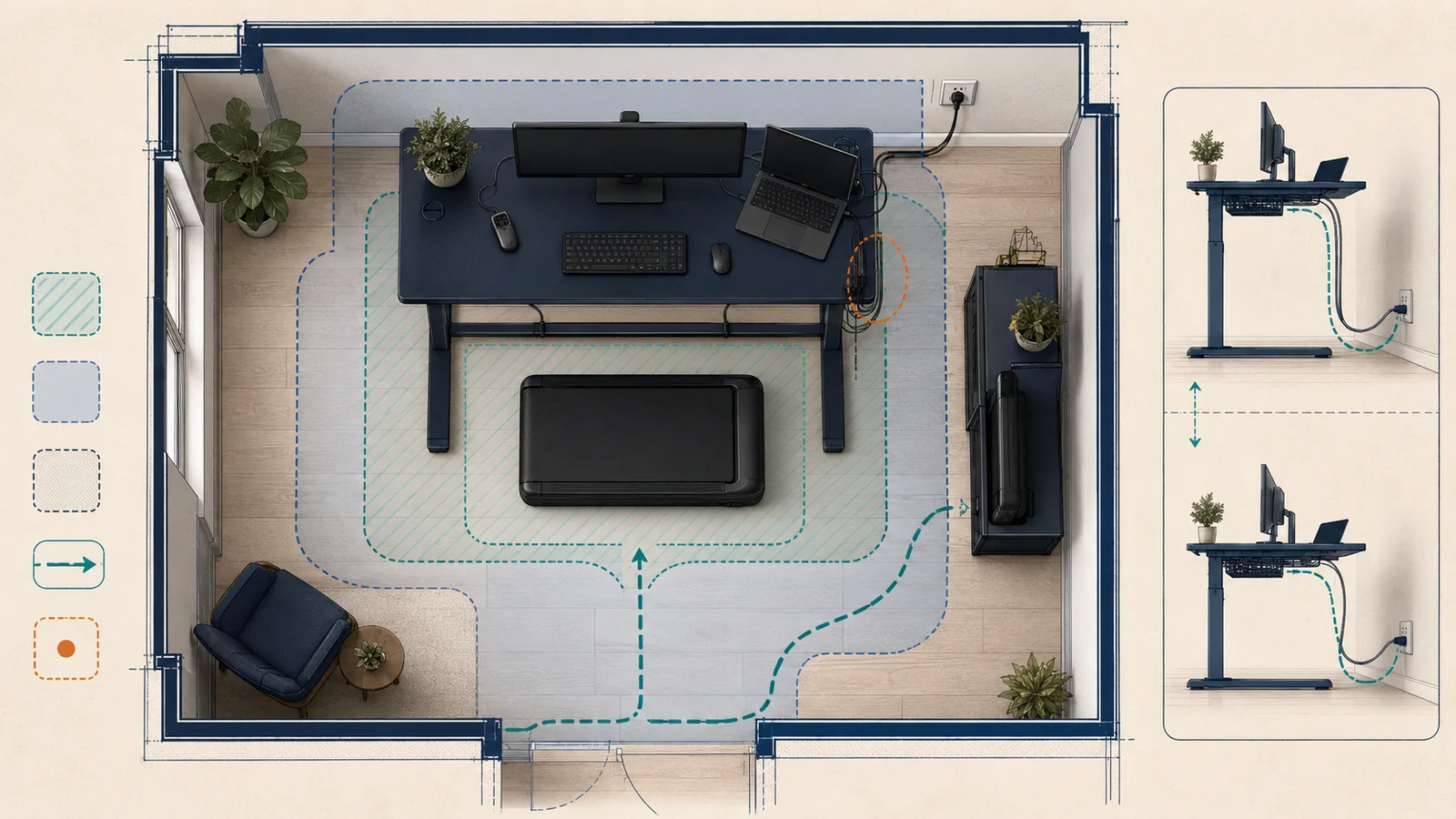
Step 2: map the operating, access, and reset zones
Draw one top-view plan and, where vertical movement matters, one side-view plan.
The top view should mark:
- walking-pad body;
- source-stated walking surface;
- desk feet and legs;
- chair footprint in its sitting and parked states;
- step-on and step-off routes;
- controller placement;
- outlet and cord route;
- door swing;
- shared household path;
- reset, cleaning, and retrieval path.
The side view should mark:
- desk frame and crossbar;
- desktop in relevant height states;
- monitor, arm, laptop, and dock;
- walking-pad deck height as an unresolved or source-stated value;
- cable slack at the lowest and highest desk states;
- any point where the desk, cable tray, drawer, or computer equipment could enter the walking-pad zone.
Do not promise a clearance from footprint alone. Preserve the exact source’s required separation, placement, and access language. When a required value is absent, record unknown_pending_exact_instructions.
Step 3: position the desk and computer components
Set the desk and computer components for the intended work task without using the walking pad as a platform, spacer, footrest, or cable bridge.
OSHA’s monitor guidance says monitor placement should be considered together with the keyboard, desk, and other workstation components. It gives general monitor-position considerations, but the page does not evaluate walking while working (OSHA monitor guidance). Treat it as workstation guidance only.
Check:
- monitor position in front of the user rather than forcing sustained side rotation;
- readable viewing distance without leaning into the desk;
- keyboard and pointing-device reach;
- stable placement of laptop, dock, monitor arm, speakers, and chargers;
- whether the desk frame changes the walking-pad approach or exit path;
- whether raising or lowering the desk pulls any cable taut;
- whether sitting and walking configurations require different component positions.
Do not convert OSHA’s general numerical examples into universal FitFootprint thresholds. The buyer’s task, vision, equipment, body dimensions, accessibility needs, and exact product instructions may require a different arrangement.
Step 4: verify the control and stop path
A control feature counts only when its exact function, compatibility, dependency, and reachable location are recorded.
WalkingPad’s current remote page lists a remote option for several named models and identifies a CR2032 battery for some variants (WalkingPad remote page). The current FAQ also describes model-dependent remote batteries and app registration (WalkingPad FAQ). These records do not prove that the buyer’s remote is present, paired, charged, responsive, or reachable.
For the exact setup, record:
| Control question | Required disposition |
|---|---|
| What starts and stops the machine? | Exact instruction or unknown |
| Can the stop control be reached without searching, bending into a conflict zone, or crossing a moving belt? | Documented layout observation or unverified |
| Is the remote model-compatible? | Exact model binding |
| Does it require a battery? | Battery type and current condition, when verified |
| Is an account, phone, app, network, or watch required? | Exact dependency or unknown |
| What happens if the primary control is unavailable? | Exact supported fallback or control_path_unresolved |
| Is there an emergency stop feature? | Preserve the exact product terminology; do not invent one |
A remote listed on a product page is not automatically an emergency-stop device. An app claim is not an observed pairing result. If the stop path is unresolved, the setup state is setup_blocked.
Step 5: route power and data cables
First follow the exact walking-pad, desk, monitor, computer, and power-accessory instructions. Do not create a workaround because the nearest outlet is inconvenient.
Map each cable from origin to destination and check it in every desk state. A route fails this workflow when a cable:
- crosses the walking surface;
- enters a step-on, step-off, reset, wheel, hinge, or retrieval path;
- can be pinched by the desk, chair, walking pad, door, or storage furniture;
- becomes taut when the desk moves;
- is concealed under a rug or object;
- depends on an unverified adapter, daisy chain, extension, power strip, or outlet;
- creates a loop that can catch a foot, wheel, pet, or cleaning tool.
The Consumer Product Safety Commission (CPSC) has long warned that extension cords and power strips must handle the required current, should not be overloaded, should not be covered, and should not create trip or pull-down risks (CPSC cord and power-strip guidance). A 2026 CPSC warning about specific CCCEI power strips further shows why exact accessory identity and current warnings matter (CPSC CCCEI warning).
Do not infer that a generic power strip, surge protector, extension cord, or desk cable tray is acceptable for the equipment. When electrical suitability is unclear, stop and use the manufacturer or an appropriately qualified electrician.
Step 6: check floor, household, and retrieval constraints
The setup record should answer:
- What floor surface and mat, if any, do the exact instructions permit?
- Can the desk, machine, and user coexist without blocking the room’s ordinary path?
- Can a child or pet enter the operating, control, cable, or hinge zone?
- Does a door, chair, drawer, bed, sofa, or cabinet block reset or storage?
- Can the buyer move the machine using the manufacturer-supported method and available handling capacity?
- Can the buyer retrieve it later without lifting, twisting, dragging, or using an unapproved orientation?
- Where will the remote, key, cord, manual, and maintenance items be stored?
- Is the intended stored state permitted, stable, dry, and protected from access?
Do not call a product easy to move because wheels are listed. Do not call a location safe because no immediate conflict is visible. Do not infer floor or structural capacity from product weight alone.
Step 7: run a powered-off layout rehearsal
Before connecting power:
- Place the desk in every relevant height state.
- Place the walking pad in the exact powered-off operating orientation.
- Put the chair in sitting, parked, and transition positions.
- Place the monitor, computer, input devices, and power supplies.
- Route unplugged cables with the slack needed for desk movement.
- Walk the approach, exit, reset, cleaning, and retrieval paths without stepping on a powered belt.
- Confirm that the intended control location remains reachable.
- Check that no frame, cable, furniture, or household path enters the mapped zones.
- Record photos or a diagram only if privacy and evidence-storage rules permit.
- Mark every unresolved instruction or electrical question.
A rehearsal pass means only that the documented powered-off layout did not expose a recorded physical-path conflict. It does not prove electrical suitability, stability, ergonomics, practical usability, safe operation, app reliability, noise, durability, or medical appropriateness.
layout_rehearsal_pass != operating_safety_pass: a layout rehearsal does not establish safe operation.physical_fit != electrical_or_practical_suitability: physical fit does not establish electrical or practical suitability.
Step 8: separate the equipment check from work tasks
If the exact manuals, control path, power path, and powered-off layout are resolved, the next step is a limited equipment function check under the manufacturer’s instructions—not immediate typing, calling, reading, carrying objects, or multitasking.
The setup record should keep these events separate:
powered_off_layout_rehearsal: layout rehearsal with the equipment powered off.limited_equipment_function_check: limited equipment function check.workstation_component_check: workstation component check.walking_while_working_observation: observation of walking while working.extended_use_observation: extended-use observation.
FitFootprint did not perform any of them for this article.
A seller’s A1 Pro or C2 page may describe under-desk use, controls, folding, or app features (A1 Pro official page; C2 official page). Those descriptions remain manufacturer claims until the exact unit and setup are inspected.
Branch: fixed-height desk
A fixed-height desk requires a stop decision before equipment placement:
- Can the work surface and input devices be positioned for the intended user and task without an improvised platform?
- Does the desk frame leave the complete operating and exit zones available?
- Can the buyer still use the desk in the required sitting mode?
- Does any keyboard tray, brace, or drawer enter the machine or user path?
- Is the monitor arrangement workable without converting OSHA guidance into a universal fit promise?
If the fixed geometry does not support the required workstation and machine states, use no_setup_or_defer. Do not compensate with an unstable riser, a walking-pad deck used as a standing platform, or an unreviewed modification.
Branch: adjustable desk
Check the full vertical travel, not only the intended walking height.
- Run the desk through its relevant range while the walking pad is powered off.
- Verify cable slack and pinch points at the lowest and highest states.
- Check frame, crossbar, drawer, tray, control box, monitor arm, and desktop movement.
- Record whether a memory preset exists without assuming it is accurate or protected from unintended activation.
- Keep the desk-control path separate from the walking-pad-control path.
An adjustable desk can reduce one fit constraint while creating moving-frame and cable constraints. Adjustability is not proof of compatibility.
Branch: fold or move after every session
When the room must return to another use, the workflow is not complete until reset and retrieval are supportable.
Record:
- exact shutdown and unplug steps;
- where the power cord and controller go;
- whether the unit must cool, rest, or remain unfolded before another step;
- the exact supported fold or movement method;
- who performs the move and what handling capacity is available;
- the entire path to the destination;
- the permitted stored orientation;
- the path required to retrieve and restore the setup.
The WalkingPad FAQ includes a seller response about automatic rest behavior after extended use for some machine categories (WalkingPad FAQ). Treat that as a current seller FAQ record, not a substitute for the exact model manual.
Branch: shared room, children, or pets
Use setup_blocked when the operating or reset zone cannot be controlled under the household’s real conditions.
The record should address:
- access while the unit is powered, cooling, reset, moved, or stored;
- remote or app control by another person;
- dangling or chewable cables;
- storage stability and retrieval;
- doors, toys, chairs, and shared work paths;
- supervision assumptions;
- the exact manufacturer’s household warnings.
Do not invent an age threshold, pet rule, supervision distance, or lockout feature. Preserve the exact current instructions. If those instructions are unavailable, keep the household-control question unresolved.
Missing or conflicting inputs
Use this disposition table:
| Missing or conflicting input | Required action |
|---|---|
| Exact model or option unclear | Stop; do not merge specifications |
| Manual unavailable or not bound to market/model | Keep product-specific setup claims withheld |
| Desk floor-frame geometry missing | Measure it or stop |
| Outlet or circuit suitability unclear | Stop and use an appropriately qualified electrician |
| Primary or fallback stop control unresolved | setup_blocked |
| Required cable route crosses an operating or movement zone | Redesign or no_setup_or_defer |
| Fold/move/storage instruction absent | Do not promise a reset routine |
| Official sources conflict | Preserve both records; do not average |
| Product warning/recall identity uncertain | Recheck the exact model and current CPSC route |
| Health, balance, accessibility, or medical suitability question | Use an appropriate clinician or accessibility professional |
The CPSC exercise-equipment recall route is a current starting point for exact-product checks, not a safety certificate and not proof that an unlisted product has no hazard (CPSC exercise-equipment recalls). For unresolved seller or product questions, use the current manufacturer support route rather than guessing (WalkingPad contact).
Hypothetical setup record
The following is fictional and exists only to demonstrate workflow behavior.
| Field | Hypothetical input | Disposition |
|---|---|---|
| Walking pad | Exact model named; current manual unavailable | Product-specific setup claims withheld |
| Desk | Adjustable; frame and foot geometry measured | Local geometry recorded |
| Room | Operating plan fits top view | Physical-path candidate only |
| Monitor/keyboard | Positions can be arranged in the standing state | Workstation candidate only |
| Primary control | Remote listed by seller | Presence/function not verified |
| Fallback control | App mentioned; account and pairing unknown | control_path_unresolved |
| Power | Outlet nearby; suitability not assessed | power_path_unresolved |
| Cable path | One computer cable crosses the retrieval route | Layout fails |
| Storage | Destination exists; exact permitted orientation unknown | Reset workflow unresolved |
| Final state | Multiple blocking inputs remain | setup_blocked |
The correct result is not “probably fine.” The record tells the buyer exactly which evidence must be obtained or which layout must change.
Stop and escalation conditions
Stop the setup when any of these applies:
- the exact model, option, market, or instructions are unresolved;
- a source-defined warning or limit is exceeded;
- the primary stop method or supported fallback is unavailable;
- the desk, chair, frame, computer, cable, door, or household path enters a required operating or exit zone;
- the only power solution depends on an unverified accessory or electrical assumption;
- a cord becomes taut, pinched, covered, or exposed to the walking or movement path;
- the buyer cannot perform the source-supported reset, movement, or storage steps;
- an abnormal sound, heat, odor, movement, display code, control failure, or damaged component appears;
- the question becomes structural, electrical, medical, accessibility-related, or beyond the evidence.
Use manufacturer support for exact product instructions and service questions. Use an appropriately qualified professional for decisions outside the manufacturer and documentary evidence.
Reset, move, and storage closeout
After any permitted function check or session, the setup record should require the exact supported shutdown sequence and then verify:
- power state;
- plug and cord state;
- controller and battery storage;
- desk and chair reset;
- cleaning and maintenance boundary;
- movement method;
- folded state when applicable;
- permitted stored orientation;
- stable destination;
- child/pet/shared-room access;
- next retrieval path;
- new damage, warning, noise, or support need.
Do not write stored merely because the product is folded or pushed beside furniture. The destination and retrieval path remain part of the system.
When to defer the setup
Choose no_setup_or_defer when:
- the room supports only the walking pad or the workstation, not both;
- the desk geometry cannot support the required work components and complete walking-pad zones;
- the required control or power route remains unresolved;
- sitting, shared-room, cleaning, emergency, or storage use would be blocked;
- the buyer needs a handrail, control feature, operating mode, accessibility feature, or support condition that is not verified;
- obtaining the missing evidence would require unsafe experimentation;
- the exact product instructions do not support the intended workflow.
A no-setup result is a valid buyer decision. It is better than converting unknowns into a favorable assumption.
Next step
Save the dated setup record, source URLs, exact model identifiers, diagrams, conflicts, and stop conditions. Recheck any time the desk, walking pad, monitor arm, chair, outlet, cable, controller, app, room use, household access, or storage destination changes.
Use the live walking-pad buyer guide for category and shortlist inputs, the home-fitness safety checks for floor, power, clearance, handling, and household diligence, and the space-measurement workflow for room and route records. For the separate exact-model fold, movement-route, handler, stored-orientation, and retrieval record, continue to the treadmill and walking-pad fold–move–store workflow; that guide does not authorize a move.
Methodology
This workflow:
- focuses on planning a walking-pad and standing-desk setup;
- follows the FitFootprint room-first evidence model;
- separates workstation guidance from walking-pad instructions;
- distinguishes physical layout, control, power, household, reset, and storage gates;
- uses exact-source language rather than universal thresholds;
- preserves missing values and conflicts;
- accepts
setup_blockedandno_setup_or_deferoutcomes; - prohibits direct-use, health, productivity, quietness, comfort, stability, safety, compatibility, and ease claims without the required evidence;
- keeps the body non-commercial;
- remains a research-based, documentation-only workflow; material changes to sources, equipment identity, claims, or evidence limitations require a fresh evidence review.
Sources
- Occupational Safety and Health Administration — Computer Workstations eTool — workstation arrangement and custom-fit boundary — checked August 27, 2026.
- Occupational Safety and Health Administration — Monitors — component-placement considerations — checked August 27, 2026.
- Occupational Safety and Health Administration — Purchasing Guide — desk, component, adjustability, and cable considerations — checked August 27, 2026.
- WalkingPad — C2 WalkingPad and four-leg standing-desk bundle — seller-defined example only — checked August 27, 2026.
- WalkingPad — FAQ — app, remote-battery, rest-code, and support leads — checked August 27, 2026.
- WalkingPad — Remote control for WalkingPad treadmills — current compatibility and battery claims — checked August 27, 2026.
- WalkingPad — A1 Pro official product page — model-scoped manufacturer claims — checked August 27, 2026.
- WalkingPad — C2 official product page — model-scoped manufacturer claims — checked August 27, 2026.
- WalkingPad — Contact — current support route — checked August 27, 2026.
- U.S. Consumer Product Safety Commission — Faulty extension cords, power strips, and surge protectors — general electrical-accessory guidance — checked August 27, 2026.
- U.S. Consumer Product Safety Commission — CCCEI power-strip warning — exact-product warning example — checked August 27, 2026.
- U.S. Consumer Product Safety Commission — Exercise Equipment recalls — exact-product recall search route — checked August 27, 2026.
- FitFootprint — How to Measure Your Space for Home Fitness Equipment — verified-live room and route workflow — checked August 27, 2026.