
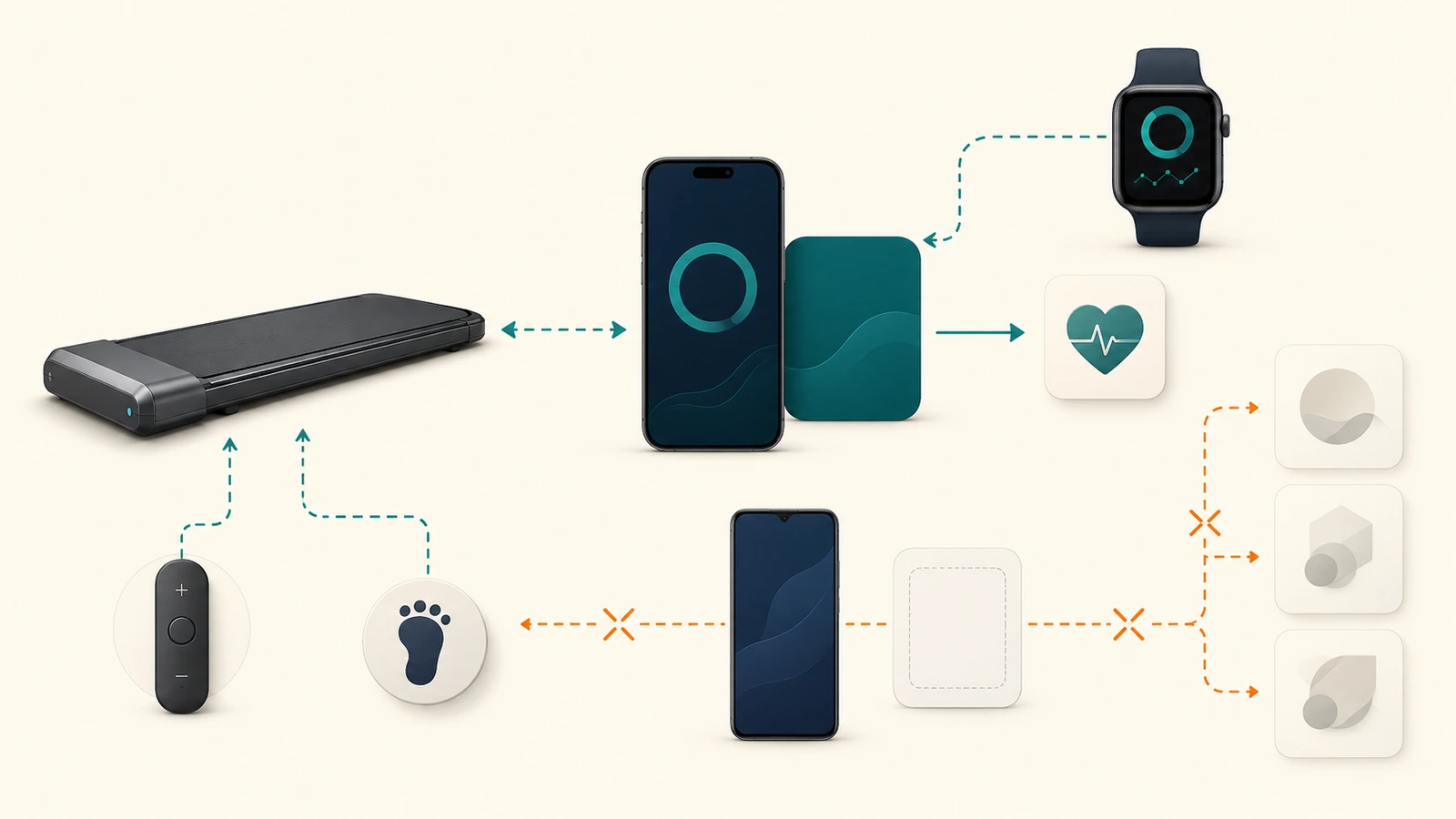
Quick answer
The current public records support a limited conclusion: WalkingPad’s US pages for the A1 Pro, C2, and R2 name KS Fit and say Apple Watch support is available through an iPhone-and-watch pairing flow. The current US iOS listing for KS Fit-Easy Workout is published by Beijing King Smith, lists iPhone and Apple Watch support, requires iOS 14 or later and watchOS 9 or later, and describes Apple Health sharing. The current Google Play listing for KS Fit is also published by Beijing King Smith and was updated August 19, 2026.
That documentary support does not prove that one exact treadmill, firmware version, phone, watch, operating-system build, account, region, and feature combination will pair or remain reliable. Before treating compatibility as part of a purchase decision, lock the exact app identity, model, device, OS, region, account requirement, connection direction, feature, and fallback. When any of those inputs is missing, the correct result is compatibility unverified pending test, not compatible.
Compatibility scope and current snapshot
This page covers the following scope only:
- US-market WalkingPad A1 Pro, C2, and R2 product-page claims;
- the current US iOS listing named KS Fit-Easy Workout;
- the current Google Play listing named KS Fit;
- Apple Watch support as described by the current product pages and iOS listing;
- Apple Health data-sharing configuration as described by Apple and the iOS listing;
- account, region, privacy, subscription, offline, fallback, and change-risk questions that affect a buyer decision.
It does not establish support for every WalkingPad model, every regional variant, every older app listing, every phone, every watch generation, every firmware revision, every third-party fitness platform, or every Bluetooth feature. It also does not rank apps or products.
The compatibility record for one buyer should include:
exact_treadmill_model_and_variant
market_and_seller
firmware_or_hardware_revision_if_available
app_name_and_store_id
app_version
phone_model_and_os_version
watch_model_and_watchos_version
region_and_account_state
connection_type
control_direction
data_direction
feature_being_checked
subscription_or_paid_feature_state
offline_and_background_state
fallback_control
observed_test_result
checked_date
Do not confuse the current app listings
The name “WalkingPad app” does not identify one stable software product.
As checked September 3, 2026, the current US App Store listing for KS Fit-Easy Workout uses app ID 6769698398, names Beijing King Smith as the seller, supports iPhone and Apple Watch, and shows version 6.6.0 dated August 19. The recheck of a regional KS Fit listing with app ID 1435554313 returned HTTP 404, so it remains only a dated identity-conflict/history record. Those two store IDs should not be treated as interchangeable without confirming which listing the US support route now intends.
A much older WalkingPad app listing with app ID 1437694173 is iPhone-only, uses version 2.4.6 dated December 7, 2021, and names Beijing King Smith. Its age, app ID, language listing, requirements, and feature description differ from the current US KS Fit listing. It is a legacy source record, not the current KS Fit identity.
A separate WalkingPad+ listing with app ID 6505090388 is sold by lolo, LLC, requires iOS 16 or later, and offers monthly and annual in-app purchases. It must not be imported into KS Fit’s identity, subscription, privacy, or support scope merely because the display name contains WalkingPad.
Keep these non-equivalences explicit:
same_or_similar_display_name != same_app_identity
old_store_listing != current_us_support_path
walkingpad_plus != ks_fit
legacy_walkingpad_app != current_ks_fit
app_store_suggestion != manufacturer_support_confirmation
Current KS Fit platform requirements
The current US iOS App Store listing states:
| Field | Current public record | Decision treatment |
|---|---|---|
| App | KS Fit-Easy Workout | Lock exact store ID before installation |
| Seller | Beijing King Smith Technology Co. Ltd. | Matches the current manufacturer app identity |
| Version shown | 6.6.0, August 19 | Volatile; recheck before a compatibility decision |
| iPhone requirement | iOS 14.0 or later | Documentary minimum, not a tested configuration |
| Apple Watch requirement | watchOS 9.0 or later | Documentary minimum, not proof that every watch feature works |
| Price shown | Free | Does not prove every feature is free or will remain free |
| Data linked to user | Email address may be collected | Developer disclosure; feature and region may change treatment |
The current Google Play KS Fit listing names the same developer, shows an update date of August 19, 2026, and describes equipment management, manual/automatic/target modes, training plans, and exercise-data records. The public page checked for this article did not expose a reliable minimum Android OS requirement. That input remains unknown.
Meeting a store minimum is only an eligibility check. It does not prove Bluetooth compatibility, model support, firmware support, background reliability, Apple Health transfer, or control permission.
Exact WalkingPad model support checked
The current US A1 Pro page, C2 page, and R2 page each list KS Fit and Apple Watch support. The A1 Pro and C2 pages say to connect KS Fit to an iPhone and pair the Apple Watch; they add that both devices should be connected if heart-rate data does not appear. The R2 page also describes Apple Watch synchronization for real-time heart-rate monitoring.
These are seller/manufacturer claims for the named page and checked date. They do not resolve:
- the exact hardware or firmware revision;
- whether every color, capacity, regional, or seller variant uses the same electronics;
- which iOS KS Fit store ID the product page expects;
- whether Android has feature parity with iOS;
- whether the watch sends data to KS Fit, to Apple Health, or directly to the equipment;
- whether app control remains available after account, network, app, OS, or service changes;
- whether the remote and FootSense fallback work independently on the buyer’s exact unit.
Do not transfer a support claim from A1 Pro, C2, or R2 to a different WalkingPad model. Do not transfer a regional app result to a US unit without rechecking identity and support.
What the phone app is officially claimed to do
The current iOS app listing, Google Play listing, and product pages for the A1 Pro, C2, and R2 collectively claim several functions:
- initiate exercise from the app;
- select manual, automatic, or target modes;
- display or record time, frequency, calories, and other workout data;
- provide plans or programs;
- adjust speed through certain programs or app controls;
- manage Kingsmith fitness devices;
- connect to supported WalkingPad models over a wireless path described by the seller as Bluetooth or app connectivity.
Those claims imply at least two possible directions:
app_to_equipment_control
equipment_to_app_data
The current records do not establish that every claimed function is available on every model, platform, region, account state, firmware version, or app version. A description that says the app can control speed is not a successful first-party pairing test. A description that says records are stored does not establish data completeness, exportability, retention, or recovery.
What Apple Watch support currently means
For the A1 Pro and C2, the product pages describe an iPhone-mediated setup: connect KS Fit to the iPhone and pair the Apple Watch. For the R2, the page additionally claims real-time heart-rate synchronization. The current iOS listing supports Apple Watch and requires watchOS 9 or later.
The checked records support the following narrow interpretation:
watch support claim = documented on the checked pages
iPhone app in path = documented
heart-rate path for named models = claimed, not tested
direct watch-to-equipment control = not verified
watch operation without iPhone = not verified
watch start, stop, or speed control = not verifiedapple_health_sharing_is_not_watch_control: sharing a Health data category does not grant the watch control of the equipment.
Do not summarize this as “the Apple Watch controls the treadmill.” The public records reviewed here do not establish direct watch-to-equipment control, app-independent watch use, or reliable real-time transfer on a tested configuration.
Apple Health data sharing is a separate path
The current iOS listing describes authorizing Apple Health sharing inside KS Fit and then adjusting source priority in Apple’s Health app. Apple explains that a user can view contributing apps and devices under Data Sources & Access, reorder them, and disable a third-party source. See Apple’s Manage Health data guidance.
This creates a separate data path:
ks_fit_or_watch -> apple_health_categoryIt does not prove:
apple_health -> treadmill_control
apple_watch -> direct_treadmill_control
apple_health_priority -> accurate_or_complete_workout_record
health_permission -> successful_pairing
Apple Health source priority also matters when multiple devices or apps contribute the same data type. A buyer who cares about steps, distance, calories, heart rate, or workout duration should record which source writes each field and how duplicates or conflicts are handled. The public records do not supply a validated deduplication or reconciliation method for this exact setup.
Connection, control, and data directions
Use a direction matrix instead of the word “sync.”
| Relationship | Current documentary state | What remains unverified |
|---|---|---|
| Phone app to equipment | Control and speed functions are claimed | Exact model/app/firmware behavior |
| Equipment to phone app | Workout records are claimed | Completeness, latency, reconnect, data loss |
| Apple Watch to KS Fit/iPhone path | Watch and heart-rate support are claimed | Exact transport and tested reliability |
| KS Fit to Apple Health | Sharing flow is documented in the iOS listing | Exact categories, duplicates, partial writes |
| Apple Health to equipment | No current support identified | Treat as unsupported for the declared scope |
| Watch directly to equipment | No direct-control evidence identified | Remains unknown, not assumed |
| App to third-party platform | Not evaluated in this guide | Requires separate platform/version scope |
The word “Bluetooth” does not establish direction, feature set, background behavior, or account independence. Record each relationship separately.
Account and region requirements
WalkingPad’s current FAQ directs users to KS Fit in both app stores. It says users should select their country before registration, that phone-number registration is only available for Chinese users, and that overseas customers should register with email.
For a US buyer, the documentation therefore supports an email-account expectation for the described registration flow. It does not establish:
- whether all functions require login;
- whether the treadmill can be discovered or controlled before registration;
- whether account creation can be completed without network access;
- whether one account can manage multiple products or households;
- whether deleting the account removes all cloud and local records;
- whether a region can be changed later without losing data or device bindings.
If the buyer refuses an account or email registration, do not assume the app path remains available. Check the exact model’s remote or other manufacturer-documented fallback separately.
Subscription and paid-feature boundary
The checked KS Fit iOS and Android store pages list the app as free. The checked WalkingPad pages for the A1 Pro, C2, and R2 call KS Fit free. No current paid KS Fit subscription was disclosed in those pages for the stated core functions.
That is not a lifetime subscription-free guarantee. The correct record is:
ks_fit_store_price_shown = free
current_paid_ks_fit_subscription_disclosed_in_checked_sources = no
future_pricing_or_feature_gating = unknown
Do not import the paid plans from WalkingPad+ into KS Fit. The WalkingPad+ App Store listing belongs to lolo, LLC and shows separate monthly and annual in-app purchases. It is a different app and commercial path.
A buyer who requires permanent no-subscription operation should verify what the exact treadmill can do with the physical remote, FootSense, safety key, console, or manual controls when the phone app is unavailable. App-free fallback must be model-specific and observed or documented; it cannot be inferred from another product page.
Android support and unknown minimum OS
The current Google Play listing proves that KS Fit is available in Google Play and that Beijing King Smith updated the listing on August 19, 2026. It also describes equipment management and workout functions. The checked public page did not expose an exact minimum Android OS version.
Therefore:
Android listing = present in Google Play
minimum Android OS = not exposed in the checked public page
Android watch support = not verified
feature parity with iOS = not verified
Apple Health path = not part of the Android scope
other Android health-platform paths = not evaluated in this review
Do not convert an install button or download count into proof that a particular Android phone supports every feature. Before purchase, check the Play Store from the exact device and region, then test the exact feature with the exact model.
Offline, background, and network behavior
The checked public records do not define a complete offline contract. Unknowns include:
- whether initial registration requires network access;
- whether device discovery or speed control works offline after login;
- whether exercise records queue locally during an outage;
- whether records are reconciled after reconnect;
- whether backgrounding the app interrupts control or data collection;
- whether the phone must remain unlocked or near the equipment;
- whether app-server unavailability changes basic equipment use;
- whether an app or firmware update is mandatory before use.
An app listing that describes one-click initiation does not answer these questions. A buyer who depends on the app for start, stop, speed, accessibility, or records should treat offline behavior as a purchase-critical unknown until tested.
Compatibility test matrix
A real compatibility check should separate documentary eligibility from observed behavior.
| Test | Required inputs | Pass evidence | Evidence available for this guide |
|---|---|---|---|
| App identity | Store, app ID, seller, version, region | Exact listing captured | Documentary only |
| Install eligibility | Phone model, OS, store region | Store permits installation | Not tested |
| Account creation | Region, email, network | Account created and recorded | Not tested |
| Equipment discovery | Exact model, firmware, Bluetooth permissions | Exact unit discovered | Not tested |
| App control | Start/stop/speed/mode within instructions | Controlled result and fallback | Not tested |
| Equipment data | Time, speed, distance, steps, calories | Field-by-field record | Not tested |
| Watch pairing | iPhone, watch, OS versions, permissions | Exact watch linked | Not tested |
| Heart-rate path | Watch, app, model, session | Source and destination verified | Not tested |
| Apple Health share | Category permissions and priority | Expected categories written once | Not tested |
| Background behavior | Screen lock, app switch, interruption | Control and records remain bounded | Not tested |
| Offline behavior | Network disabled under safe protocol | Documented function and recovery | Not tested |
| Fallback | Remote/FootSense/console state | Exact fallback works as instructed | Not tested |
| Export/deletion | Account and support path | Data exported/deleted as requested | Not tested |
Do not use an app-store rating, download count, seller demo, or isolated user review as a substitute for this matrix.
Data permissions, privacy, and deletion
The current iOS listing says an email address may be collected and linked to the user for app functionality. The current Google Play disclosure says the app may share health and fitness, files and documents, and other data types; may collect photos and videos; encrypts data in transit; and allows a deletion request. These are developer-provided store disclosures, not a complete independent privacy audit.
Record at least:
account_identifier
permissions_requested
health_categories_read
health_categories_written
photos_or_video_access_reason
third_party_sharing_disclosure
data_export_path
data_deletion_request_path
local_data_after_account_deletion
retention_and_backup_state
The checked records do not establish a general export format, a complete deletion timeline, or how treadmill records behave after account deletion. If these are required, use the current in-app help route or the manufacturer contact page and preserve the response as dated evidence.
Case: A1 Pro with iPhone and Apple Watch
Hypothetical inputs:
model = A1 Pro, exact US variant not yet physically verified
phone = iPhone on supported iOS
watch = Apple Watch on supported watchOS
app = current US KS Fit-Easy Workout listing
account = US region with email registration
required feature = workout record plus watch heart rate
Documentary result: documentary support with named conditions. The A1 Pro page names KS Fit and Apple Watch, and the current iOS listing supports iPhone and Apple Watch. The result remains conditional because exact hardware identity, firmware, app ID expected by the product, permissions, pairing, heart-rate route, duplicates, and fallback were not tested.
Do not call this compatible until the exact unit passes the relevant rows in the test matrix.
Case: C2 with an Android phone
Hypothetical inputs:
model = C2, exact US color and hardware revision unresolved
phone = Android device
app = Google Play KS Fit listing
required feature = device discovery, app speed control, and workout records
Documentary result: compatibility unverified pending test. The C2 page names KS Fit, and Google Play offers KS Fit, but the minimum Android OS was not surfaced in the checked page, feature parity with iOS is unknown, and no exact device pairing occurred.
The buyer should check install eligibility from the exact phone and region, then test discovery, control direction, records, reconnect, and physical fallback.
Case: R2 with Apple Watch heart-rate claims
Hypothetical inputs:
model = R2, exact current US unit
phone = supported iPhone
watch = supported Apple Watch
required feature = real-time heart-rate display or record
Documentary result: documentary support present, but observed compatibility remains unverified. The R2 page expressly claims Apple Watch synchronization for real-time heart rate. The checked sources do not establish whether the heart rate appears on the watch, phone, KS Fit record, treadmill display, or Apple Health; nor do they establish latency, gaps, duplicate writes, or behavior when one connection drops.
A test must identify the source, transport, destination, display, saved record, and recovery behavior.
Case: app-free fallback
Hypothetical buyer requirement:
must_start_stop_and_adjust_speed_without_phone
must_continue_basic_operation_if_account_or_service_is_unavailable
The A1 Pro, C2, and R2 pages describe remote controls, and some pages also describe FootSense or other controls. Those claims justify checking a fallback; they do not prove the exact remote is included, paired, reachable, powered, or independent of an app/firmware state on the buyer’s exact unit.
Result before exact verification: no-app or defer. A buyer who treats app-free control as non-negotiable should not rely on the app listing. Verify the exact manual, included controls, safety key where applicable, and a limited function check before accepting the product.
Missing or conflicting inputs
The following gaps block a final compatibility conclusion:
- the product page does not bind the claim to a hardware or firmware revision;
- current US iOS KS Fit uses a different store ID and display name from the older regional KS Fit listing;
- the legacy WalkingPad app remains visible but is not the current KS Fit path;
- WalkingPad+ has a similar name but a different seller and subscription model;
- minimum Android OS was not exposed in the checked Google Play page;
- direct watch-to-equipment control was not documented;
- offline, background, reconnect, firmware, and mandatory-update behavior remain undefined;
- account-free functionality remains undefined;
- data export and complete deletion behavior remain undefined;
- no exact pairing or feature test occurred.
The controlled unknowns remain explicit: minimum_android_os_unknown, offline_behavior_unknown, background_behavior_unknown, firmware_compatibility_unknown, data_export_unknown, data_deletion_unknown, and direct_watch_to_equipment_control_unknown.
Do not resolve these gaps by selecting the most favorable listing, averaging app versions, assuming newer means compatible, or treating the manufacturer logo as a tested result.
When compatibility is not verified
The controlled outcomes used on this page are documentary_support_present, documentary_support_with_named_conditions, compatibility_unverified_pending_test, unsupported_for_declared_scope, and no_app_or_defer.
Use these reader-facing outcomes:
- Documentary support present: a current official record names the exact model, platform, or feature, but no direct test occurred.
- Documentary support with named conditions: official support exists only when stated model, OS, account, region, app, or device conditions are met.
- Compatibility unverified pending test: an applicable support path exists, but one or more required inputs or observed results are missing.
- Unsupported for the declared scope: the checked official records do not support the exact feature or direction being requested.
- No-app or defer: the buyer requires a capability or fallback that cannot be verified before purchase.
None of these labels means safe, reliable, private, medically appropriate, or recommended.
No-app or defer outcome
Defer the app-dependent purchase when any of these conditions is non-negotiable and unresolved:
- the exact phone cannot install the current app;
- the exact model is not named in current support records;
- account or email registration is unacceptable;
- app-free start, stop, or speed control cannot be verified;
- the required watch feature is direct control rather than a heart-rate/data path;
- offline or service-outage operation is essential;
- data export or deletion is required but not documented;
- a paid or subscription-free boundary cannot be established;
- a critical feature depends on an untested app, firmware, or background behavior.
A product can still be physically usable while failing the buyer’s compatibility requirements. Compatibility is one decision layer, not a substitute for fit, safety, controls, or total ownership review.
Version, firmware, and support-change triggers
Recheck this record when:
- an app store changes app ID, seller, display name, version, price, OS minimum, privacy disclosure, or subscription;
- a WalkingPad page changes the named app, Apple Watch wording, control list, model identity, or availability;
- a new firmware or hardware revision appears;
- Apple changes Health permissions, source priority, or watch requirements;
- Google Play exposes a new Android requirement or data-safety disclosure;
- a support page is removed, redirected, or region-restricted;
- direct testing produces a materially different result;
- the scheduled content review date arrives.
A date change alone is not an update. Reconcile the exact source, model, app, platform, and feature.
Next step
Before buying for an app-dependent use case, create one compatibility row for the exact model and required feature. Capture the current store listing, OS eligibility, account and region, product-page support, control/data direction, fallback, and every unknown. If the feature is purchase-critical, require a returnable test path or defer the product.
For adjacent room and exact-product context, see the walking pad buyer guide, WalkingPad A1 Pro analysis, WalkingPad C2 analysis, and A1 Pro versus C2 comparison. These pages provide separate category, product, and comparison context; they do not replace an exact app, model, device, account, firmware, or feature test.
For a related exercise-bike app path, see the documentation-only Exercise Bikes Compatible With the Peloton App: Verification Guide; its documented metrics and pairing limits remain explicit.
For a broader platform comparison, see the documentation-only JRNY vs Peloton App vs Zwift for Compatible Home Equipment; plan, device, metric, control, data-flow, fallback, and unresolved evidence boundaries remain explicit.
For the broader app, data, subscription, and service lock-in boundary, see App Shutdown, Data, Subscription, and Device Lock-In Risks in Smart Fitness.
Methodology
FitFootprint compared current public records from WalkingPad, Apple, the Apple App Store, and Google Play on September 3, 2026. The review separated app identity, exact model scope, platform minimums, account/region requirements, connection direction, control direction, data direction, Apple Health sharing, watch claims, subscription, privacy disclosures, offline behavior, fallback, and tested status.
Manufacturer and store claims are labeled documentary. No product, phone, watch, app, account, firmware, pairing, permission, data transfer, subscription, offline path, fallback, export, deletion, or service workflow was inspected or tested. Unknown remains unknown. This documentation-only guide does not establish a tested compatibility result or recommendation.
Sources
- Apple App Store — KS Fit-Easy Workout, US listing, app ID 6769698398 — seller, version, iOS/watchOS requirements, Apple Health sharing, price and privacy disclosure — checked September 3, 2026.
- Google Play — KS Fit, package com.kingsmith.xiaojin — developer, update date, functions and data-safety disclosure — checked September 3, 2026.
- WalkingPad — FAQ — store availability, region selection, overseas email registration and connection guidance — checked September 3, 2026.
- WalkingPad — Contact — current support route and model/order identifiers — checked September 3, 2026.
- WalkingPad — A1 Pro product page — KS Fit, Apple Watch and control claims for the named product page — checked September 3, 2026.
- WalkingPad — C2 product page — KS Fit, Apple Watch and control claims for the named product page — checked September 3, 2026.
- WalkingPad — R2 product page — KS Fit, Apple Watch heart-rate and control claims for the named product page — checked September 3, 2026.
- Apple Support — Manage Health data — permissions, contributing sources and source-priority behavior — checked September 3, 2026.
- Apple App Store — older regional KS Fit listing, app ID 1435554313 — app-identity and store-ID conflict record; current recheck returned HTTP 404 — checked September 3, 2026.
- Apple App Store — legacy WalkingPad listing, app ID 1437694173 — legacy identity, version and platform record — checked September 3, 2026.
- Apple App Store — WalkingPad+, app ID 6505090388 — separate lolo, LLC seller, OS requirement and in-app purchase record — checked September 3, 2026.